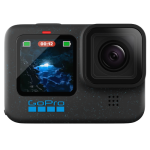



DJI Osmo Pocket 4 Standard Combo
- 1" CMOS & 4K/240fps
- 3-Axis Stabilization & 2" Rotatable Touchscreen
- Active Track 7.0
- 107GB of built-in storage and up to 800MB/s transfer

Powered by a 1-inch CMOS sensor, Osmo Pocket 4 captures stunning 4K/240fps footage [1] and clear low-light shots. It delivers cinematic depth via 14 stops of dynamic range [2] and 10-bit D-Log [3]. Its 2× lossless zoom [4] and 3-axis stabilization bring distant beauty within reach. Just rotate the screen to record!
Key Features
Superior Image Quality
Osmo Pocket 4’s new 1-inch CMOS and f/2.0 aperture create soft bokeh for dimensional, clear portraits. With 14-stop dynamic range [2] and 10-bit D-Log [3], it captures rich details and authentic colors, even in high-contrast scenes like the seaside or dusk.
Sharper Views With Lossless Zoom [4]
Enjoy 2× lossless zoom [4] for sharp, clear footage, even from a distance. Simply tap the dedicated zoom button once to switch between 1× and 2× views, capturing each moment just as you imagine.
Ultra HD Slow Motion
Record in 4K/240fps [1] to slow down life’s joyful moments, capturing every frame with smooth, dynamic clarity.
Good Times, Always in Frame
Compact and portable, Osmo Pocket 4 records everything from family moments to travel adventures, and is ideal for vlogs and live streams. For a life unscripted, you need a tool that’s ready.
Family Moments
Effortlessly capture smiles and playful moments, preserving the warmth of family time.
Vibrant Landscapes
Enable D-Log [3] for flexible post-editing and true-to-life restoration of every colour and light detail.
Vivid Cityscapes
Capture vibrant streets and glowing skylines with sharp, stable footage.
On-the-Go
Compact and durable, it travels with you to capture the people and places that make every journey unforgettable.
Pro-Level Creation
Create high-quality vlogs and livestreams with ease using 3-axis stabilization and 4K imaging.
Stable Footage on the Move
Walk, film, and create effortlessly with 3-axis stabilization. From playing kids to scenic views, Osmo Pocket 4 keeps every moment steady. Plus, multiple gimbal modes allow for even smoother, silkier camera movements.
Subject First With Intelligent Autofocus
Intelligent autofocus keeps your subject sharp. Enable “Subject Lock Tracking” [8] to automatically lock onto and track your subject; simply tap a detection box on the screen to switch focus subjects. Alternatively, use “Registered Subject Priority” [8] to prioritize focusing on a pre-registered subject.
Slow Shutter Video
Supports slow-shutter shooting in Video mode. Manually adjust shutter speeds to create motion blur, capturing movement trails and the passage of time for a unique visual experience.
SpinShot
The gimbal rotates 180° for smooth, single-handed shots.
Motionlapse
Easily set up to four positions for dynamic Motionlapse videos. From city lights to drifting clouds, condense hours into stunning seconds with one tap.
Auto Landscape/Portrait
Auto rotate mode intelligently adjusts according to screen orientation, optimizing framing needs for both short video and long video platforms.
Panorama Photo
Switch to Panorama mode to capture wide-open scenes in a single shot.
Film Tone [10]
Choose from diverse film tones [10] to easily recreate classic styles and capture master-grade tones.
In-Camera Beautify [10]
Enable in-camera Beautify [10] to fine-tune skin smoothness, brightness, and tone for a natural look in both selfies and group shots.
OsmoAudio 4-Channel Output [7]
Osmo Pocket 4 supports direct connection to DJI Mic transmitters, enabling 4-channel audio recording. It captures clear vocals while simultaneously recording ambient sound through the built-in microphone array. Video editing software [14] can directly process the four audio channels, streamlining your creative workflow.
Spatial Audio & Audio Zoom
Spatial audio recording delivers a truly immersive listening experience on headphones. Audio zoom adjusts sound with distance as you zoom in or out, making playback more vivid and real.
Built-in Storage & Fast Transfer
With 107GB of built-in storage and up to 800MB/s transfer [5], you can shoot and transfer footage in one go, without needing a memory card, streamlining your workflow.
Extended Runtime & Fast Charging
Osmo Pocket 4 can be charged to 80% in just 18 minutes [15], providing up to three hours of shooting [16]. When fully charged, it can record up to 240 minutes of 1080p/24fps footage [16], giving you more time to get the shots you love.
Auto Axis Lock for Easy Storage
The gimbal auto-locks for storage when powered off. Manual lock is also available for quicker, safer packing.
DP Output & Wi-Fi Livestreaming [17]
Supports 4K DisplayPort video output and 1080p Wi-Fi livestreaming [17] for smooth, stable broadcasts and business streaming.
Timecode
Built-in timecode keeps drift under 1 frame in 8 hours [18], enabling fast, accurate multi-camera syncing in post-production.
What's in the Box?
1 x Osmo Pocket 4
1 x USB-C to USB-C PD Cable (USB 3.1)
1 x Osmo Pocket 4 Gimbal Clamp
1 x DJI Wrist Strap
1 x Osmo Pocket 4 Handle With 1/4″ Thread
1 x Osmo Pocket 4 Portable Carrying Pouch
1 x Quick Start Guide
1 x Safety Guidelines
1 x DJI Store Promotion Card
Disclaimers
1. 4K/240fps video recording is only supported in Slow Motion mode.
2. In both Normal and D-Log color profiles, the maximum dynamic range reaches 14 stops. In Slow Motion mode, the actual dynamic range may be lower than 14 stops.
3. The 10-bit D-Log color profile is only supported in normal Video mode.
4. 2× lossless zoom is not supported in Low-Light, Slow Motion, or Timelapse modes.
5. Data was tested in a controlled laboratory environment. When using the provided USB-C to USB-C PD Cable (USB 3.1) or another USB 3.1-compliant cable, you can export data from built-in storage at a maximum transfer rate of 800 MB/s.
6. ActiveTrack is not supported in Panorama, Timelapse, Motionlapse, SpinShot modes, or when the gimbal is in FPV mode and the device is held horizontally. For optimal tracking performance, use in well-lit environments. ActiveTrack updates are available via the DJI Mimo app. Please contact DJI Support for details.
7. Four-channel output requires connecting the DJI Mic transmitter. Direct connection to the first-generation DJI Mic is not supported. DJI microphones are sold separately.
8. Subject Lock Tracking and Registered Subject Priority are supported in Video and Photo Pro modes, as well as in Hyperlapse mode. They are not available in Panorama, Timelapse, or Motionlapse modes.
9. The effective range for Gesture Control is 0.5 to 5 m at 1× zoom and 1 to 7 m at 2× zoom. To control ActiveTrack or recording, use the specific gestures (Palm or V-Sign) and avoid covering your head with your hand. The effective distance may change with future firmware updates.
10. Film Tone and in-camera Beautify are only available in Video mode and cannot be used simultaneously. When Film Tone is enabled, the in-camera Beautify settings are unavailable. If the in-camera Beautify is already enabled, switching to Film Tone mode will disable the beautify effect.
11. The App Glamour Effects feature is available only in Video and Low-Light modes, not available in Photo or other modes.
12. Before recording, enable App Glamour Effects on Osmo Pocket 4. After recording, export the footage using the DJI Mimo app to apply glamour effects.
13. Sold separately or as part of a combo.
14. Four-channel audio editing requires the DJI Mimo app or other professional video editing software.
15. Tested in a laboratory environment with the DJI 65W Portable Charger (sold separately).
16. Tested at room temperature of 25° C (77° F) and 1080p/24fps (16:9), with Wi-Fi off and screen off. This data is for reference only.
17. Supports Wi-Fi mobile livestreaming via the DJI Mimo app, or PC livestreaming via UVC or DP video output (capture card required).
18. Applicable only within an operating temperature range of 0° to 40° C (32° to 104° F).
19. 4K/120fps video recording is only supported in Slow Motion mode.
20. Osmo Pocket 3 does not support 2× lossless zoom in Low-Light, Slow Motion, Timelapse, ActiveTrack, D-Log, or Photo modes. Zoom ratios cannot be switched during recording.
21. Due to firmware updates, the UI may vary. Please refer to the actual display.
Featured